The BEST File Manager for Windows
Works with and greatly enhances:
Windows 11, 10
Windows 8, 7, Vista, XP
Servers 2003 and later
Starting at just $50 for home use and $69 for a business license (and a business two-pack for just $99!)
What's New / What's Up
Version 4: the future
Major new tools, significant upgrades to current components and faster folder listings.
- Find and rename problem files: bad paths, illegal characters, Linux & iOS (Mac) characters.
- Check files and folders for compliance with different file systems e.g., NTFS, Fat-16, Fat-32, eFat, CDs, iOS, Linux and custom.
Know if the files are right before you copy. - Delete files no matter their length or how they are named.
- Powerful renaming with RegEx e.g. change 'Romeo Smith' into 'Smith, Romeo' and much more.
- Lightening fast directory listing no matter how large the folder.
- Detailed reports for copy errors.
- Variable text size for views and dialogs.
- and many more improvements and fixes..
See the V4 preview here.
Update May 2017
A May 2017 Microsft security update for Windows 10 conflicted with a major routine in FileBoss resulting in FileBoss not starting on some Windows 10 systems.
Versions V3.101 and later, fix the problem. You can read more about this at the page
Windows Creators Conflict.
Comparing, Merging & Pruning
Compare Folders, Paths and Drives
 (The following describes a incredibly powerful and configurable method of comparing, merging and purging folders and paths.
To see a quick way to copy new or modified, and only new or modified modified, files to a backup or alternate location see the Quick Merge tool. It really makes it easy to merge one folder or path into another.)
Use the power of Virtual Folders to Compare
Folders, Paths, Drives and even Network storage areas. Comparing folders creates a new Virtual Folder with two folders, paths or drives of your choosing and once evaluated arranges the files for viewing.
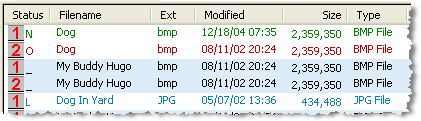
Once compared both Folders / Paths
- can be Merged together
- one updated from the other
- only selected files merged
- lonely or other files copied or deleted
- and much, much more.
Automatic, Semi-automatic and Manual merging
allows you to merge only what you want
Comparison results can be easily used to remove files as well
You can select files by their status (Same, Newer, Older, Lonely) and then do anything with them you like such as deleting them.
Detailed control if necessary
After selecting a group of files you inspect them individually to decide if they should be included in any merge operation.
Hide files and folders that are not relevant
so that you can better see and work with files that are newer, older, lonely or the same depending on your needs.
Almost all of FileBoss's normal file manipulations routines
are available to you so you can clean up the folders or paths
Complete Details
Click here for in-depth details about comparing, merging and purging (including screen shots)

 What do you need to do today?